
Canon
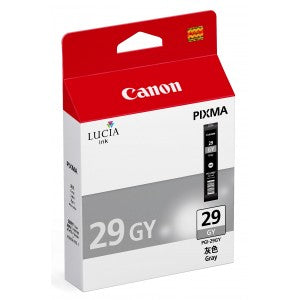
Canon 4871B002 PGI-29GY Gray Ink Tank for PIXMA PRO-1
Canon 4871B002 PGI-29GY Gray Ink Tank for PIXMA PRO-1
SKU: 4871B002
- Regular price
- Price: $50.99
- Regular price
- List Price:
- Sale price
- Price: $50.99
- Unit price
- per
Couldn't load pickup availability
Out of stock
 PRODUCT DESCRIPTION
Canon 4871B002 PGI-29GY Gray Ink Tank for PIXMA PRO-1
Overview
The Canon 4871B002 (PGI-29GY) is a genuine OEM LUCIA pigment gray ink tank engineered for the Canon PIXMA PRO-1 professional photo printer. It delivers professional-quality photo prints with superior longevity, rated at approximately 179 A3+ photos. Canon's FINE (Full Photolithographic Inkjet Nozzle Engineering) technology ensures exceptional sharpness and detail. It fits the Canon PIXMA PRO-1 printer.
Key Features
- Genuine Canon OEM: Manufactured to Canon's exact specifications for consistent professional photo quality
- LUCIA Pigment Ink: Specially formulated gray pigment ink for professional photo prints and superior archival longevity
- ~179 A3+ Photos: Rated at approximately 179 photos in A3+ size
- FINE Technology: Full Photolithographic Inkjet Nozzle Engineering delivers exceptional sharpness and detail
- Individual Ink System: Replace only the colour that runs out, reducing waste and saving money
- Printer Warranty Protection: Genuine Canon ink maintains your printer's warranty coverage
Specifications
- SKU / MPN: 4871B002
- Cartridge Series: PGI-29GY
- Colour: Gray
- Ink System: LUCIA pigment
- Ink Type: Pigment-based
- Photo Yield: ~179 A3+ photos
- Print Technology: Inkjet (FINE)
- Pack Quantity: 1 tank
- Brand: Canon
- Weight: 0.21 lbs
Compatibility
The Canon 4871B002 PGI-29GY is compatible with the following Canon PIXMA printer:
- Canon PIXMA PRO-1
Frequently Asked Questions
- What printers does the 4871B002 work with? — The Canon PGI-29GY is designed exclusively for the Canon PIXMA PRO-1 professional photo printer.
- How many pages does the 4871B002 print? — It is rated at approximately 179 photos in A3+ size.
- Is the 4871B002 a genuine Canon cartridge? — Yes. The 4871B002 is an authentic Canon OEM LUCIA pigment ink tank, manufactured by Canon to original specifications.
Why Choose the Canon 4871B002?
As a genuine Canon original LUCIA pigment ink tank, the PGI-29GY delivers smooth, archival-quality gray output for enhanced monochrome and black-and-white photo printing on the Canon PIXMA PRO-1. FINE technology ensures exceptional sharpness and detail, while the individual ink system reduces waste and lowers cost per print. Available at ParNet, Canada's trusted source for genuine printer consumables.
